Monday, 1 June 2020

showModalDialog Polyfill - Implementation

Hello prog.NET,

Did you used "Window.showModalDialog()" on your code? If that so, you must be have a problem with solution for implementation on other browsers except IE "Internet Explorer" because it was blocked or removed by dev browser;

example "Firefox" | "Chrome"
https://developer.mozilla.org/en-US/docs/Web/API/Window/showModalDialog

This feature is obsolete. Although it may still work in some browsers, its use is discouraged since it could be removed at any time. Try to avoid using it.

This method was removed in Chrome 43 and Firefox 56.


Here'e i will give you another solution for that method.

When your web application using "Window.showModalDialog()" but it's not support for other browser an you did't want to changed, you can used showModalDialog Polyfill by niutech.
https://github.com/niutech/showModalDialog

showModalDialog Polyfill
This is a window.showModalDialog() shim using a modal HTML5 dialog element and ECMAScript 2015 Generators or ECMAScript 2017 Async/Await. It was tested in the latest Google Chrome and in the latest Mozilla Firefox with the dom.dialog_element.enabled preference set to true in about:config.


but code in that web doesn't completed for me, because i tested on Firefox the dialog position is not fixed and here'e i'm give the solution. I'm using ASP.NET for example;

CSS Code

dialog {
position: fixed;
top: 50%;
transform: translate(0, -50%);
}
.overlay{
position: fixed;
top: 0;
left: 0;
width: 100%;
height: 100%;
z-index: 10;
background-color: rgba(0,0,0,0.5); /*dim the background*/
}


Project Interface


WebModalDialog-ASPNet


Remarks;
- showModalDialog Polyfill - Implementation
- showModalDialog Polyfill not working on firefox
- showModalDialog Polyfill dialog position
- Solution / alternative showModalDialog on firefox or chrome


Noted;
  • The dialog tag defines a dialog box or subwindow.
  • The dialog element makes it easy to create popup dialogs and modals on a web page.

Browser Support

Thankyou, i hope this article are helpful.
Remember for best solution is using Bootstrap.
https://getbootstrap.com/docs/4.0/components/modal/

Saturday, 28 April 2018

BlogViewer Tool - Boost your blog pageviews and increase adsense impressions

BlogViewer Tool
is Android application that can help your blog to reach pageviews target each post or random and if Adsense working for you it's very best options to increase impressions.

Screenshoot


Features
  • Fast Boosting
  • IP Address Details
  • Automatic Backup|Restore Settings
  • Automatic Clear Cache App
  • Custom Settings

Sunday, 22 December 2013

[eMo]Web Browser Optimizer


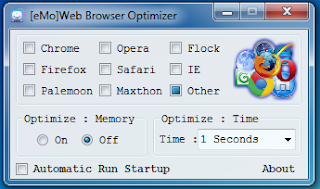
[eMo]Web Browser Optimizer is a free software that provide means for memory optimization of browsers. It’s a handy and lightweight tool that lets you quickly and easily optimize memory for the chosen browser. [eMo]Web Browser Optimizer supports all major browsers including Google Chrome, Internet Explorer, Mozilla Firefox, Opera Mini, Safari, GreenBrowser, Maxthon, Pale Moon etc.

Tutorial


Key Features of [eMo]Web Browser Optimizer :
  • Free memory optimization tool for browsers.
  • Works with all major browsers.
  • Also supports some less-popular browsers like Flock, Netscape, Avant Browser etc.
  • Adjustable optimization time.
  • Minimize to system tray.
  • Run on startup.
  • Simple interface.
  • Lightweight and handy.
  • Easy to use.
  • Save setting browsers.
  • Add Manual Others Browser. - New
VirusTotal

[eMo]Web Browser Optimizer

Thursday, 7 November 2013

[Internet Download Manager] IDM Optimizer


With less than 650KB, an impressive GUI and responsive user interaction, com0do99+ Softwares presents the freeware [Internet Download Manager] IDM Optimizer.
This Application was made to be the simplest and functional application to make.

Here is some features of this application:
  • Optimizing Type/Speed Connection
  • Optimizing Max Connection
  • Proxy Settings
  • 100% written in .NET to avoid false positives problems.
  • Smooth GUI with nice animations.

The software compatibility:

- Windows XP or higher with .NET Framework 2.0 installed.


About IDM Optimizer Maker:

- Custom build licensed to com0do99+.
- Internal engine developed by Denmas.Arhyf.
- Graphic design built by Denmas.Arhyf.


[Internet Download Manager] IDM Optimizer

How to Detect Listen port Bitvise Ssh Client

Hi, finally i'm back to share posting "How to Detect Listen port Bitvise Ssh Client".

Why I'm share this posting?
Because i'm always use Bitvise to access my VPS on desktop, and i has build application that used Bitvise SSH. Then i have problem how to detect listen port of my bitvise profile is connected or not. I'm already looking on google how to that, but at the end I can not found it. So I have an idea with used third party application, that's "Paping".
What is Paping
Paping (pronounced pah ping) is a computer network administration utility used to test the reachability of a host on an Internet Protocol (TCP/IP) network and to measure the time it takes to connect to a specified port.

Syntax: paping [options] destination
Options:
  • -?, --help
  • -p, --port N
  •  -t, --timeout
  • -c, --count N
Bitvise services socks is TCP/IP listen interface, so that why i use paping command.
SSH port forwarding https://www.bitvise.com/port-forwarding


As you can see my SSH port forwarding is listen on 127.0.0.1 port 1081, below is the log if my SSH server success connected.
Question is how to automation my ssh with other application.
Oke let's begin, you must read our current article :
Our Application :
After that open our project "RedirectStandardOutput-Paping" , do some modified in Method OutputHandler 
I will send command paping to ping localhost/127.0.0.1 with port 1081
Command : 127.0.0.1 -p 1081

public void OutputHandler(object sendingProcess, DataReceivedEventArgs outLine)
        {
            SetText(outLine.Data);
//Add if conditional
if(outLine.Data.Contains("Connected")) MessageNox.Show("Your SSH Connected");
else(outLine.Data.Contains("Connection timed out")) MessageNox.Show("Your SSH Disconnected");
        }

Finally , rebuild your project.
Thank You

Wednesday, 6 November 2013

How to Bypass Captcha binbox.io


About Binbox.io

Binbox started as a self-serve publisher network where you could earn money to share your links. They goals have always been to be the top-paying and most user-friendly pastebin. As of today we are one of the only pastebins that allows you to publish, earn, and advertise all from one network.

How It Works

They pay you when you create pastes and share the links through Binbox. When someone views your paste, we credit your account with the amount relevant to that visitor's country. Upon opening the paste, your visitors will complete a captcha and view ads that we run. You receive payment from the funds we receive from advertisers. The more people you bring to your pastes, the more you will earn.


Fast step how to bypassed captcha on binbox.io link, i used this step because sometimes response of submit button captcha were so long to redirect the paste text. In this step i used google chrome, or you can used the other browsers.

Ok let see the steps :
1. Open binbox.io link, wait until the loading is complete
2. Right click on text "Solve the aptcha below to prove you are human." then select Inspect element


3. Find 'div' class of "captcha-modal" ---> <div id="captcha-modal">


4. Right clik on <div id="captcha-modal"> and then select Delete node


------------------------Finish, Now you can see the paste text .


Thank you
sorry for my bad english .

Tuesday, 8 October 2013

Csharp - Redirect Output of Process

RedirectStandardOutput eliminates the need for output files. It allows us to use a console program directly inside a C# program.

Related Article Process in C#:
C# (CSharp) Process - .NET Framework

I wanted to launch a script from a Windows Form application and display the standard output in a text box as the process was running. Surely you're not surprised to learn that multithreading is involved. It turns out you'll have at least four threads running to do this simple task.

A script or executable can be run using System.Diagnostics.Process. The string FileName is set to the executable (e.g. perl.exe, Run.bat, ConsoleApplication.exe). The string Arguments is set to the command-line arguments for that executable (e.g. perlscript.pl, filename1.txt filename2.txt, etc). The following code will start that executable.

I will use Paping executable on this example.
Here are syntax option paping.exe command
Now download Paping here and paste in your project folder bin\Debug
Design your Windows Form project

We have 1 Label , 2 TextBox and 2 Button
Code inside Form is

        delegate void SetTextCallback(string text);

        public Form1()
        {
            InitializeComponent();
        }
 
        private void SetText(string text)
        {
            // InvokeRequired required compares the thread ID of the
            // calling thread to the thread ID of the creating thread.
            // If these threads are different, it returns true.
            if (this.textBox1.InvokeRequired)
            {
                SetTextCallback d = new SetTextCallback(SetText);
                this.Invoke(d, new object[] { text });
            }
            else
            {
                this.textBox2.AppendText(text + Environment.NewLine);
            }
        }
 
        private void button1_Click(object sender, EventArgs e)
        {
            Process process;
            process = new Process();
            process.StartInfo.FileName = Application.StartupPath + "\\paping.exe";
            process.StartInfo.Arguments = textBox1.Text;
            process.StartInfo.UseShellExecute = false;
            process.StartInfo.CreateNoWindow = true;
            process.StartInfo.RedirectStandardOutput = true;
            process.OutputDataReceived += new DataReceivedEventHandler(OutputHandler);

            process.Start();
            process.BeginOutputReadLine();
        }

        public void OutputHandler(object sendingProcess, DataReceivedEventArgs outLine)
        {
            SetText(outLine.Data);
        }

        private void button2_Click(object sender, EventArgs e)
        {
            Process[] pcs_check = Process.GetProcessesByName("paping");
            if (pcs_check.Length > 0)
                foreach (var p in pcs_check)
                    p.Kill();
        }

The ouput of paping command
www.google.com -p 80 -c 4
it's mean ping address google with port 80 and count until 4 time.


Download full source project "RedirectStandardOutput-Paping"

Monday, 16 September 2013

C# (CSharp) Process - .NET Framework


Starts a process resource and associates it with a Process component.
Namespace: System.Diagnostics
Assembly: System (in System.dll)

The System.Diagnostics namespace contains functions that allow you to manage processes, threads, eventlogs and performance information.

The System.Diagnostics.Process object gives you access to functionality enabling you to manage system processes. We will use this object to get a list of running processes.

Add this line to your using list:

using System.Diagnostics;

Process. A process starts. It does something important. And then it terminates. With processes, we run separate programs at the level of the operating system.
Start, a static method, calls external applications. It allows users to view documents and web pages. It also executes EXE programs and command-line utilities.
A Project - Arguments:
The Process.Start method has overloaded forms. So you can call it with more than argument.

C# program that open notepad
using System.Diagnostics;

class Program
{
        static void Main()
       {
               // Use Process.Start here.
               Process.Start("Notepad.exe");
       }
}


For more information about this example, here.

ProcessStartInfo:
In this example we use ProcessStartInfo. In it, we can store a process' properties: details of its execution.
C# program that open notepad with argument
using System.Diagnostics;

class Program
{
      static void Main()
     {
           ProcessStartInfo startInfo = new ProcessStartInfo();
           startInfo.FileName = "notepad.exe";
           startInfo.Arguments = "/A C:\filetext.txt";
           Process.Start(startInfo);
      }
}


Properties. To refresh our memory, here is a partial listing of Process properties. We will use most of these when starting programs from a program.
ProcessStartInfo:
Stores information about the process—specifically how the process is started and its configuration.
FileName:
The program or filename you want to run. It can be a program such as "NOTEPAD.EXE". Sometimes we can just specify a file name.
Arguments: Stores the arguments, such as -flags or filename. This is a string property.
CreateNoWindow: Allows you to silently run a command line program. It does not flash a console window.
WindowStyle: Use this to set windows as hidden. ProcessWindowStyle.Hidden is often useful.
UserName, WorkingDirectory, Domain: These control OS-specific parameters—for more complex situations.

You can learn more Process Properties List on msdn here. ^_^
Oke I think it's enough simple information about "C# (CSharp) Process -  .NET Framework"

Read another related article :
How to redirect output of Process on C# (Csharp) .Net Framework

Thursday, 5 September 2013

proxyTunnelGUI - Stable


proxyTunnelGUI - Stable is quite simply faster, more stable, boost faster for HTTP/S tunneling using proxyTunnel, Tunnelier and Proxifier.proxyTunnelGUI - Stable is an application displays you the connectivity status and IP. It also displays upload and download size with current time.


Key Features of proxyTunnelGUI - Stable
  • Network Meter
  • 6 clientProfile Ssh
  • 5 modeSsh - launcher
  • - +1, +2, +4, +6, +8, +12
  • loadProfile .bscp
  • Automatic read listen port profile .bscp

proxyTunnelGUI - Stable

Clover


Wings for your Windows Explorer!

Clover is an extension of the Windows Explorer, to add multi-tab functionality similar to Google Chrome browser. After install Clover, you will be able to open multiple folders within the same window, and you can also add folder bookmarks.

Features :

Convenient Tab page

Just remember that Ctrl + T to open the page, and Ctrl + W to close the page, Ctrl + Tab to switch pages, the work efficiency far more than doubled!
Seamless integration with operating system

Clover was integrated into Windows Explorer, to keep your usual habits, without having to learn new file management operation.
Lightning-fast bookmarks bar

Press Ctrl + D to bookmark the current path, or drag the folder into the bookmarks bar. No need to look for the folder around, instant reach, how happy!

For more information
-> http://ejie.me/

Monday, 19 August 2013

How to configure "Other Browser Setting" [eMo]Web Browser Optimizer

[eMo]Web Browser Optimizer

YouTube - In Action
How to configure "Other Browser Setting" [eMo]Web Browser Optimizer

Here I will show the new feature of [eMo] Web Browser Optimizer , that is Added : New Interface "Other Browser Setting" with input name process details.
Ok lest check it ^__^

Step 1. Checked on "Other" optional


That will opened Interface of "Other Browser Setting" to configure including an other browser from process name details.

Step 2. Click “Add” button on Other Browsers Interface


Before added new other browser and fill the required box on Interface “Add Other Browser” we must go to taskmanager to check the details process browser we want and Right click – Go to “Properties”.
In here I use firefox process details as an example.

And then that will open the details process of your browser,

Now we can fill the textbox of “Add Other Browser”

Step 3. Fill the textbox required other [eMo] Browser process


On fill Min /Kbps it will reduce of Minimal process firefox, same as Max /Kbps too.
That’s end the tutorial How to configure another [eMo] Web Browser added other “Browsers” .
Thank You

Monday, 12 August 2013

Dawn Of Steel Game Android, Windows, Apple


by flaregames
Dawn of Steel – a true mobile RTS
  • Engage in raging battles, command gigantic battle walkers with intuitive direct-touch controls!
  • Entrench yourself in a fortfied base, with base-building of unmatched tactical depth!
  • Experience the warfare of the future in Dawn of Steel for iOS, a game by RTS development veterans!
Command a powerful force of mechanized walkers and crush enemy bases in Dawn of Steel, an action-packed real-time strategy game. Your combat skills alone determine the outcome of the battle. Establish your base and defend it with all your might against attacks from other players.

Use direct controls to command your units during combat, and organize your defenses to best exploit the enemy’s weaknesses. Intuitive swipe commands let you unleash powerful attacks from your Rigs with a flick of your finger. Dawn of Steel is the highly awaited first game from hot game studio Superweapon, a small team of veteran Command & Conquer developers.

Experience Dawn of Steel:
• A gorgeous world with stunning FX rendered in full 3D
• Fine-tune your attacks with direct unit control
• Intuitive swipe mechanics for devastating special attacks
• Four powerful Rigs with wholly unique abilities
• Hundreds of different customization options
• Unlock and conquer new territories across a dynamic world
• Build the perfect base, balance your defenses, and crush your opponents

See more :
Tips and Trick Game Dawn Of Steel "Hack,Mod APK,Cheat,Video"

The race to conquer the planet Leviathan and mine the mysterious energy source Plasma is on! Take control of immensely powerful mechanized walkers called Rigs as you raid enemy bases, and claim their resources as your own. Gain the upper hand by customizing and upgrading your forces to suit your own style of play. Expand your control over the planet, as you unlock new territories to conquer.


Dawn of Steel is free to download and play, however some game items can also be purchased for real money. If you don’t want to use these features, please disable in-app purchases in your Google Play settings. According to our Terms of Service, Dawn of Steel is allowed for download and play only for persons 13 years or more of age, or with explicit parental consent.

Wednesday, 24 July 2013

How to use [eMo]Web Browser Optimizer ?

Optimize Browser Memory with [eMo]Web Browser Optimizer :
[eMo]Web Browser Optimizer opens as a small window listing all main browsers on the interface, along with a check-box. You just need to "check" the respective check-box of every browser you want to optimize.

YouTube - In Action
How to use [eMo]Web Browser Optimizer ?

Easy Steps are Here :

Step 1. Check the respective browser.
If you don’t find your browser listed there, you can tick the “Other” option. This will open a new window where you can find a drop-down listing some other browsers like Avant Browser, Comodo Dragon, K-Meleon etc.


Choose the desired browser of you can type the name of process your browser in Taskmanager and then press button "OK".

Step 2. Choose and Select optimization time.
Optimization Time : to set the length of time optimization.

Step 3. Click "On" optimization memory.
Click on "On" radio button on the main program window. [eMo]Web Browser Optimizer will then immediately start optimizing your browser’s memory.

Sunday, 30 June 2013

AutoIt GUI Designer: Koda 1.7.3.0


When I know AutoIt programming language, I know that is not easy to design using script language but when follow on AutoIt forum was a development team:
Martin Woods (Lookfar)
Dmitry Yudin (Lazycat)
creating forms (GUIs) for AutoIt3 scripting language. Thats was wonderfull help me to design form GUI and small application.

Koda is a standalone application that was developed to help creating forms (GUIs) for AutoIt3 scripting language.

Features shortlist

visual designing forms
simultaneous multiple forms editing
generates new code or updates existing script
easy-to-use templates gallery for organizing your templates
import existing GUI scripts (even those not created by Koda)
customizable toolbars
multilingual

Latest versions

Example :


Thank You ^__^

Create Your Own URL Shortener With "YOURLS"


Create Your Own URL Shortener With "YOURLS"

* What is Yourls

YOURLS stands for Your Own URL Shortener. It is a small set of PHP scripts that will allow you to run your own URL shortening service (a la TinyURL or bitly).

Running your own URL shortener is fun, geeky and useful: you own your data and don't depend on third party services. It's also a great way to add branding to your short URLs, instead of using the same public URL shortener everyone uses.


Ok Lets Start the Tutorials,...

Create Your Own URL Shortener With "YOURLS" in Action - YouTube

Setup

1. You must have domain hosting for "URL Shortener"
Or you can sign up on IdHostinger

2. Download YOURLS from Github
In here I used the latest realease

3. Setup your domain hosting and Go Database management, create new database
Example :

4. Import / Setup Website template with file Yourls.zip


Configuration

1. After finish install / import Yourls, Go to File Manager >> Folder "User"
Example :

2. Duplicate , Rename and Edit file config.php
Settings as

/** MySQL database username */
define( 'YOURLS_DB_USER', 'your db user name' );

/** MySQL database password */
define( 'YOURLS_DB_PASS', 'your db password' );

/** The name of the database for YOURLS */
define( 'YOURLS_DB_NAME', 'yourls' );

/** MySQL hostname.
** If using a non standard port, specify it like 'hostname:port', eg. 'localhost:9999' or '127.0.0.1:666' */
define( 'YOURLS_DB_HOST', 'localhost' );

/** MySQL tables prefix */
define( 'YOURLS_DB_PREFIX', 'yourls_' );

** If you define it to "http://site.com", don't use "http://www.site.com" in your browser (and vice-versa) */
define( 'YOURLS_SITE', 'http://site.com' );

3. And then Go to your domain name "/admin" , setup Yourls domain

Wait for installing complete ,,..
Thats the and of tutorial, Create Your Own URL Shortener With "YOURLS"
You can test it,. Simple

Thank You ^__^